🏫 School/[23-2] 객체지향프로그래밍
[C++] String & File
- -
Software & Hardware의 구성
- Hardware 구성 : processor, memory, video card, disk drive, keyboard, mouse, monitor
- Software 구성 : storage내의 file, RAM의 character
String (software component)
- Data : character로 구성
- Functions : string addition / search / size / remove
| operator [] | 해당 index에 저장되어 있는 값을 알려줌 |
| operator = | string을 다른 것에 할당 |
| operator + | 어떤 string을 다른 string의 마지막에 이어 붙임 |
| at | 원하는 index의 charcter를 뱉어줌 |
| length | string의 length를 뱉어줌 |
| size | string의 size를 뱉어줌 (length와 거의 동일) |
| find | string 에서 원하는 글자의 index를 나타냄 만약 찾는 문자열이 없으면 string::npos을 반환 |
| substr | 기존의 string에서 원하는 만큼과 동일한 새로운 string 을 만들어 줌 |
| empty | 만약 string이 비어있으면 true를 내뱉어 줌 |
| clear | string 내의 모든 character 제거 |
그 외의 다른 function들은 아래의 사이트에서 확인할 수 있음
https://cplusplus.com/reference/string/string/?kw=string
https://cplusplus.com/reference/string/string/?kw=string
cplusplus.com
#include <iostream>
#include <string>

using namespace std;

int main () {
	// string을 선언하고 초기화
    string word = "fred";
    cout << word.length << '\n'; // 4개의 character로 구성되어 있으므로 4가 출력됨
    if (word.empty())
    	cout << "empty\n";
    else
    	cout << "not empty\n" // not empty가 출력될 것
    word.clear(); // 빈 string으로 만듦
    if (word.empty())
    	cout << "empty\n";
    else
    	cout << "not empty\n" // empty가 출력될 것
    word = "good";
    cout << word << '\n';
    word += "-bye";
    cout << word << '\n'; //good-bye 출력될 것
    cout << word[0] << '\n'; // g 출력
    cout << word[word.length()-1] << '\n';
	cout << word.substr(2,5); // index가 2인거 부터 5글자
    cout << word.substr(2); // index가 2인거 부터 끝까지

    string first = "ABC", last = "XYZ";
    cout << first + last << '\n'; // ABCXYZ 출력
}
File Input & Output
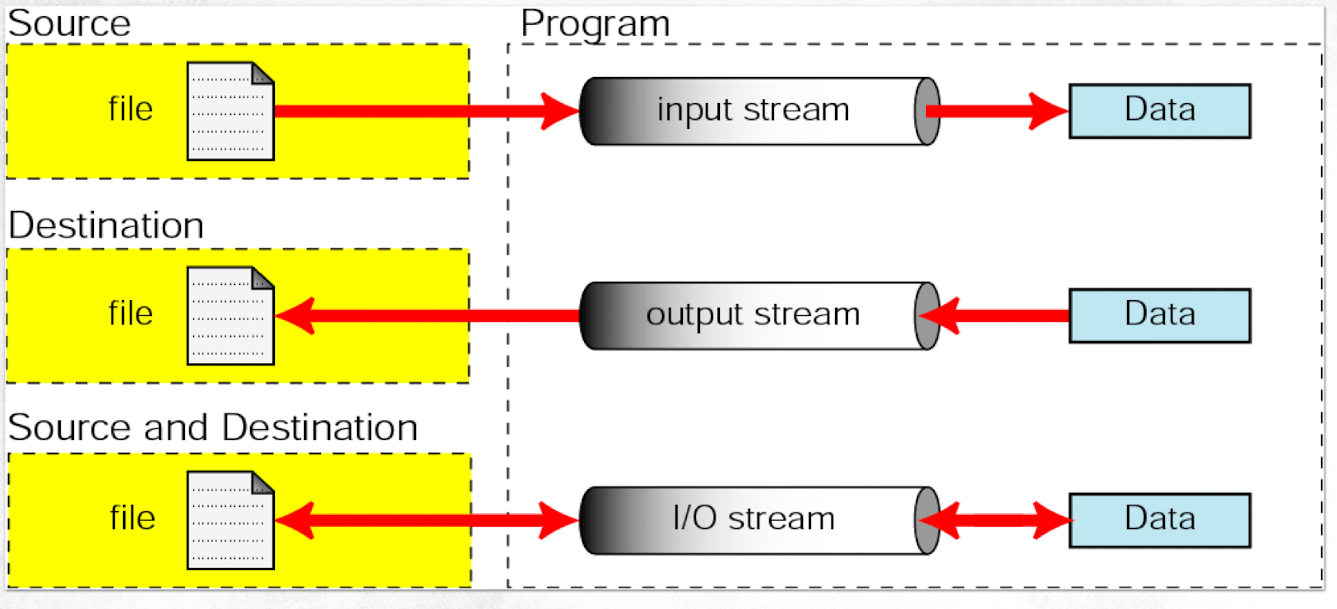
[C++에서의 file stream]
- ifstream : 파일로 부터 읽어 올거야!
- ofstream : 파일에 쓸거야!
- fstream : 파일에 읽고 쓸거야! (단, 읽기를 위한 것인지 쓰기를 위한것인지 혼돈이 생길 수 있어 잘 쓰지는 않음)
[File stream을 생성 또는 연결을 끊기]
- file stream 생성 : ifstream[] / ofstream[] / fstream[]
- file stream 연결 : open()
- file stream 연결 해제 : close()
[File 읽기 및 쓰기]
// Reading from file
int main() {
    ifstream fsTemp;
	int a;
	fsTemp.open (“temp.txt");
    fsTemp >> a;
    cout << a;
    fsTemp.get(a); /*6번 줄과 동일한 의미*/
	cout << a;
}
// Writing to file
int main() {
ofstream fsTemp;
int a;
fsTemp.open (“temp.txt”);
cin >> a;
fsTemp << a;
fsTemp.put(a); //17번 줄과 동일한 의미
}[Formatting Data Using control variables]
- .width() : 출력할 길이를 설정
- .fill() : 데이터의 길이보다 출력하고 싶은 길이가 더 길때, 비어있는 공간을 뭐로 채울지 설정해줌
- .precision() : 소숫점 아래 어디까지 쓸건지 설정해줌
[Stream Flags]
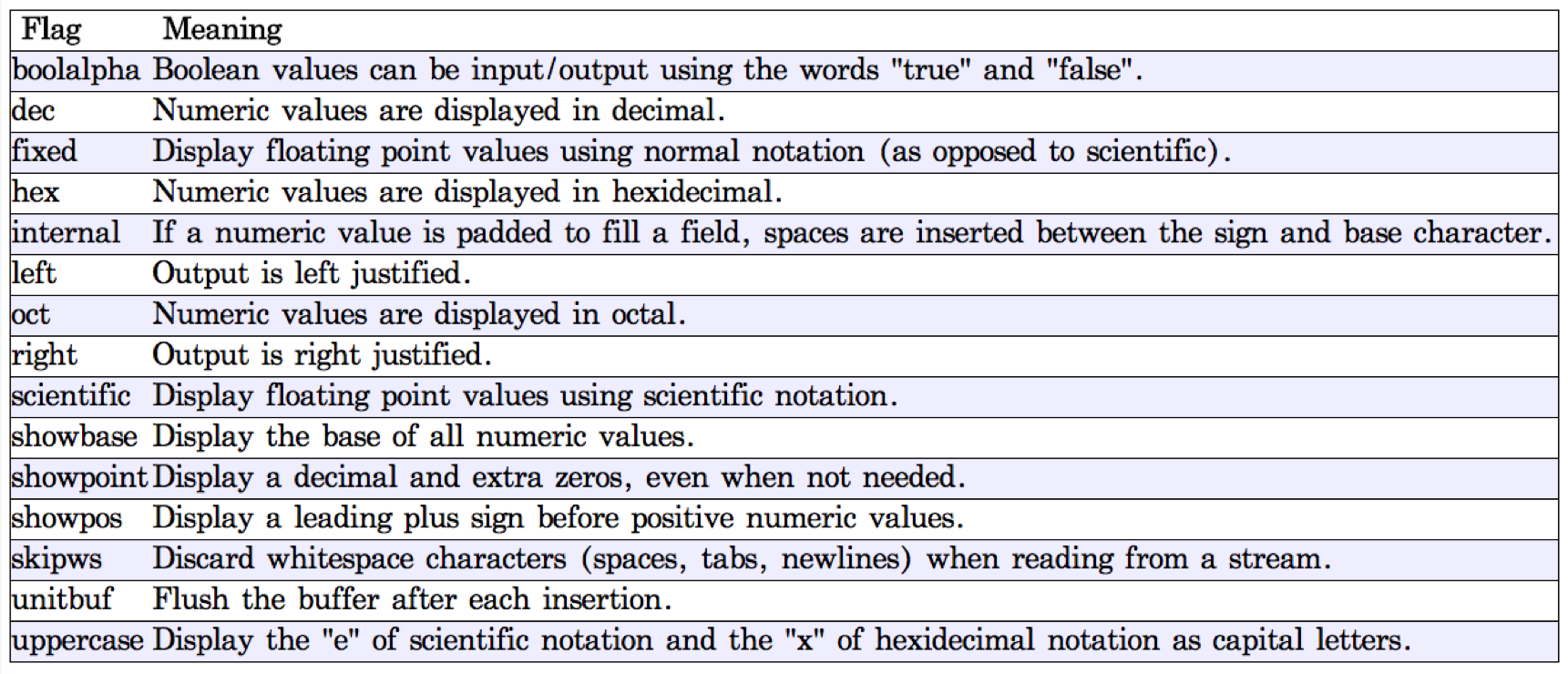
file에 대한 더 많은 함수들은 아래 사이트에서 확인할 수 있음
https://cplusplus.com/reference/fstream/fstream/?kw=fstream
https://cplusplus.com/reference/fstream/fstream/?kw=fstream
class <fstream> std::fstream typedef basic_fstream fstream; Input/output file stream class Input/output stream class to operate on files. Objects of this class maintain a filebuf object as their internal stream buffer, which performs input/output operation
cplusplus.com
'🏫 School > [23-2] 객체지향프로그래밍' 카테고리의 다른 글
| [C++] Lab #01&02 (0) | 2023.10.20 |
|---|---|
| [C++] Pointer & Vector & Array (0) | 2023.10.16 |
| [C++] 조건문과 반복문 (2) (0) | 2023.10.04 |
| [C++] 조건문과 반복문 (1) (0) | 2023.10.04 |
| [C++] 함수에 대한 기본 설명 (2) (0) | 2023.10.04 |
Contents
소중한 공감 감사합니다